This page was generated from a Jupyter notebook. You can download it here.
Orbit Initialization
This tutorial covers all the ways to initialize orbits in galpy, from raw phase-space coordinates to observed sky positions and astropy SkyCoord objects.
[1]:
%matplotlib inline
import numpy
from astropy import units
from galpy.orbit import Orbit
from galpy.potential import MWPotential2014
import warnings

warnings.filterwarnings("ignore", category=RuntimeWarning)
warnings.filterwarnings("ignore", category=UserWarning)
Standard 3D initialization
The most basic way to create an orbit is by specifying phase-space coordinates in galactocentric cylindrical coordinates [R, vR, vT, z, vz, phi] (in natural units where \(R_0 = 1\), \(V_0 = 1\)).
[2]:
# Full 3D orbit with azimuth
o = Orbit([1.0, 0.1, 1.0, 0.0, 0.05, 0.0])
print(f"Orbit dimension = {o.dim()}, phase-space dimension = {o.phasedim()}")
print(f"R = {o.R()}, vT = {o.vT()}")
Orbit dimension = 3, phase-space dimension = 6
R = 1.0, vT = 1.0
If the orbit is in an axisymmetric potential, the azimuth phi can be omitted:
[3]:
# 3D orbit without azimuth (axisymmetric potentials)
o_noaz = Orbit([1.0, 0.1, 1.0, 0.0, 0.05])
print(f"Orbit dimension = {o_noaz.dim()}, phase-space dimension = {o_noaz.phasedim()}")
Orbit dimension = 3, phase-space dimension = 5
2D and 1D orbits
galpy also supports planar (2D) and linear (1D) orbits.
[4]:
# 2D orbit with azimuth: [R, vR, vT, phi]
o2d = Orbit([1.0, 0.1, 1.0, 0.0])
print(
    f"2D with phi: orbit dimension = {o2d.dim()}, phase-space dimension = {o2d.phasedim()}"
)

# 2D orbit without azimuth: [R, vR, vT]
o2d_noaz = Orbit([1.0, 0.1, 1.0])
print(
    f"2D no phi: orbit dimension = {o2d_noaz.dim()}, phase-space dimension = {o2d_noaz.phasedim()}"
)

# 1D orbit: [x, vx]
o1d = Orbit([1.0, 0.1])
print(f"1D: orbit dimension = {o1d.dim()}, phase-space dimension = {o1d.phasedim()}")
2D with phi: orbit dimension = 2, phase-space dimension = 4
2D no phi: orbit dimension = 2, phase-space dimension = 3
1D: orbit dimension = 1, phase-space dimension = 2
Physical units with ro= and vo=
By setting ro (distance scale in kpc) and vo (velocity scale in km/s), the orbit will return quantities in physical units.
[5]:
o_phys = Orbit([1.0, 0.1, 1.0, 0.0, 0.05, 0.0], ro=8.0, vo=220.0)
print("R =", o_phys.R(), "kpc")
print("vT =", o_phys.vT(), "km/s")
print("vz =", o_phys.vz(), "km/s")
R = 8.0 kpc
vT = 220.0 km/s
vz = 11.0 km/s
Astropy Quantity inputs
You can also initialize with astropy Quantities directly.
Tip
If you do input and output in physical units, the internal unit conversion specified by ro= and vo= does not matter!
[6]:
o_qty = Orbit(
    [
        8.0 * units.kpc,
        22.0 * units.km / units.s,
        220.0 * units.km / units.s,
        0.0 * units.kpc,
        11.0 * units.km / units.s,
        0.0 * units.rad,
    ]
)
print("R =", o_qty.R(), "kpc")
print("vT =", o_qty.vT(), "km/s")
print("vz =", o_qty.vz(), "km/s")
R = 8.0 kpc
vT = 220.0 km/s
vz = 11.0 km/s
In this case, it is unnecessary to specify the ro= and vo= scales; when they are not specified, ro and vo are set to the default values from the configuration file. However, if they are specified, then those values rather than the ones from the configuration file are used.
Inputs to any Orbit method can also be specified with units as an astropy Quantity. galpy’s natural units are still used under the hood, as explained in the section on physical units in galpy.
If for any output you do not want the output in physical units, you can specify this by supplying the keyword argument use_physical=False.
From observed coordinates
Initialize from sky coordinates using radec=True (RA/Dec in degrees, distance in kpc, proper motions in mas/yr, radial velocity in km/s) or lb=True (Galactic l,b).
[7]:
# From RA, Dec: [RA, Dec, dist, pmRA*cos(Dec), pmDec, vlos]
o_radec = Orbit(
    [20.0, 30.0, 2.0, 3.5, -1.2, 15.0],
    radec=True,
    ro=8.0,
    vo=220.0,
)
print("RA =", o_radec.ra(), "deg")
print("Dec =", o_radec.dec(), "deg")
RA = 20.000000000000007 deg
Dec = 30.000000000000068 deg
Similarly, from Galactic coordinates (l, b):
[8]:
# From Galactic l, b
o_lb = Orbit(
    [150.0, 40.0, 1.5, 2.0, -0.5, 30.0],
    lb=True,
    ro=8.0,
    vo=220.0,
)
print("l =", o_lb.ll(), "deg")
print("b =", o_lb.bb(), "deg")
l = 150.00000000000009 deg
b = 39.99999999999995 deg
You can also use Galactic UVW velocities instead of proper motions and radial velocity by setting uvw=True:
[9]:
# From Galactic UVW velocities
o_uvw = Orbit(
    [150.0, 40.0, 1.5, -10.0, 20.0, 5.0],
    lb=True,
    uvw=True,
    ro=8.0,
    vo=220.0,
)
print("R =", o_uvw.R(), "kpc")
R = 9.010946140355266 kpc
These observed coordinates are translated to the Galactocentric cylindrical coordinate frame by assuming a position and velocity for the Sun. The position is specified using ro=8.0 and zo=0.0208, the distance from the Galactic center to the Sun and the height of the Sun above the Galactic plane, respectively, both in kpc (note that the value for the Sun’s height is taken from Bennett & Bovy 2019). The velocity is broken up into the
circular velocity at the Sun’s position and the Solar motion. The Solar motion can be specified as solarmotion='schoenrich' (default; 2010MNRAS.403.1829S), a few other pre-configured values, or as a velocity array. The circular velocity is specified as vo=220 in km/s. Note that currently, the ro and vo values are used both for the conversion from observed coordinates to Galactocentric cylindrical coordinates and for the
internal unit conversion to galpy’s natural units. This means that if you specify ro and vo here, then those values will be used for the internal unit conversion as well. This is a bit of a quirk of the current implementation and it is something to be aware of.
Tip
Initialization using observed coordinates can also use units. So, for example, proper motions can be specified as 2*units.mas/units.yr.
From astropy SkyCoord
A convenient initialization method uses astropy SkyCoord.
[10]:
from astropy.coordinates import SkyCoord

sc = SkyCoord(
    ra=20.0 * units.deg,
    dec=30.0 * units.deg,
    distance=2.0 * units.kpc,
    pm_ra_cosdec=3.5 * units.mas / units.yr,
    pm_dec=-1.2 * units.mas / units.yr,
    radial_velocity=15.0 * units.km / units.s,
)
o_sc = Orbit(sc)
print("R =", o_sc.R(), "kpc")
print("vT =", o_sc.vT(), "km/s")
print("vz =", o_sc.vz(), "km/s")
galpyWarning: Supplied SkyCoord does not contain (galcen_distance, z_sun, galcen_v_sun) and these were not explicitly set in the Orbit initialization using the keywords (ro, zo, vo, solarmotion); these are required for Orbit initialization; proceeding with default values
R = 9.184075578439423 kpc
vT = 211.75521495765548 km/s
vz = -6.563744262668287 km/s
In this case, you can still specify the properties of the transformation to Galactocentric coordinates using the standard ro, vo, zo, and solarmotion keywords, or you can use the SkyCoord Galactocentric frame specification and these are propagated to the Orbit instance. For example,
[11]:
from astropy.coordinates import CartesianDifferential

c = SkyCoord(
    ra=20.0 * units.deg,
    dec=30.0 * units.deg,
    distance=2.0 * units.kpc,
    pm_ra_cosdec=-10.0 * units.mas / units.yr,
    pm_dec=20.0 * units.mas / units.yr,
    radial_velocity=50.0 * units.km / units.s,
    galcen_distance=8.0 * units.kpc,
    z_sun=15.0 * units.pc,
    galcen_v_sun=CartesianDifferential([10.0, 235.0, 7.0] * units.km / units.s),
)
o_sc = Orbit(c)
print("R =", o_sc.R(), "kpc")
print("vT =", o_sc.vT(), "km/s")
print("vz =", o_sc.vz(), "km/s")
R = 9.183292770206958 kpc
vT = 413.59345320539325 km/s
vz = 128.2716357089369 km/s
Warning
Subtleties when using SkyCoord:
galcen_distanceandroare not interchangeable:galcen_distanceis the distance between the Sun and the Galactic center, whilerois the projection of this distance onto the Galactic midplane.The astropy
Galactocentricframe is right-handed, while galpy normally uses a left-handed frame. So the sign of the x-component ofgalcen_v_sunis the opposite of what it would be insolarmotion.
The Sun’s orbit
Calling Orbit() with no arguments returns the Sun’s orbit.
[12]:
o_sun = Orbit()
print("Sun: R =", o_sun.R(), "kpc")
print("Sun: z =", o_sun.z(), "kpc")
Sun: R = 8.0 kpc
Sun: z = 0.0208 kpc
Turning physical units on and off
When orbits are initialized using radec=True, lb=True, or a SkyCoord, physical scales ro= and vo= are automatically specified (using defaults of ro=8 and vo=220). All outputs will then be in physical units. You can toggle physical-unit output at any time. If you want outputs in galpy’s natural coordinates, turn physical output off:
[13]:
o_toggle = Orbit([1.0, 0.1, 1.0, 0.0, 0.05, 0.0], ro=8.0, vo=220.0)
print("Physical on:", o_toggle.R())

o_toggle.turn_physical_off()
print("Physical off:", o_toggle.R())

o_toggle.turn_physical_on()
print("Physical on again:", o_toggle.R())
Physical on: 8.0
Physical off: 1.0
Physical on again: 8.0
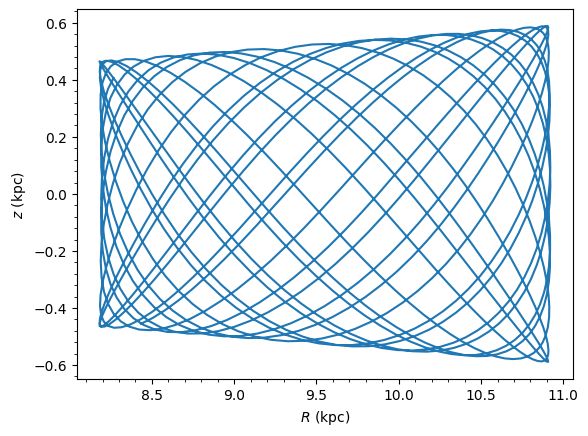
Example: initialize from SkyCoord, integrate, and plot
This example combines orbit initialization with integration and plotting. For more details on orbit integration, see Integration and Plotting.
[14]:
from astropy.coordinates import SkyCoord
from matplotlib import pyplot as plt

# Initialize from a SkyCoord (e.g., a nearby star)
sc = SkyCoord(
    ra=150.0 * units.deg,
    dec=20.0 * units.deg,
    distance=0.5 * units.kpc,
    pm_ra_cosdec=-5.0 * units.mas / units.yr,
    pm_dec=3.0 * units.mas / units.yr,
    radial_velocity=-20.0 * units.km / units.s,
)
o_example = Orbit(sc)
o_example.integrate(MWPotential2014)
o_example.plot();